Pokémon Card Condition Guide: Near Mint, LP, MP, HP & Damaged Explained
Learn how to inspect Pokémon card corners, edges, surfaces and bends, and what common condition labels mean when buying or selling.
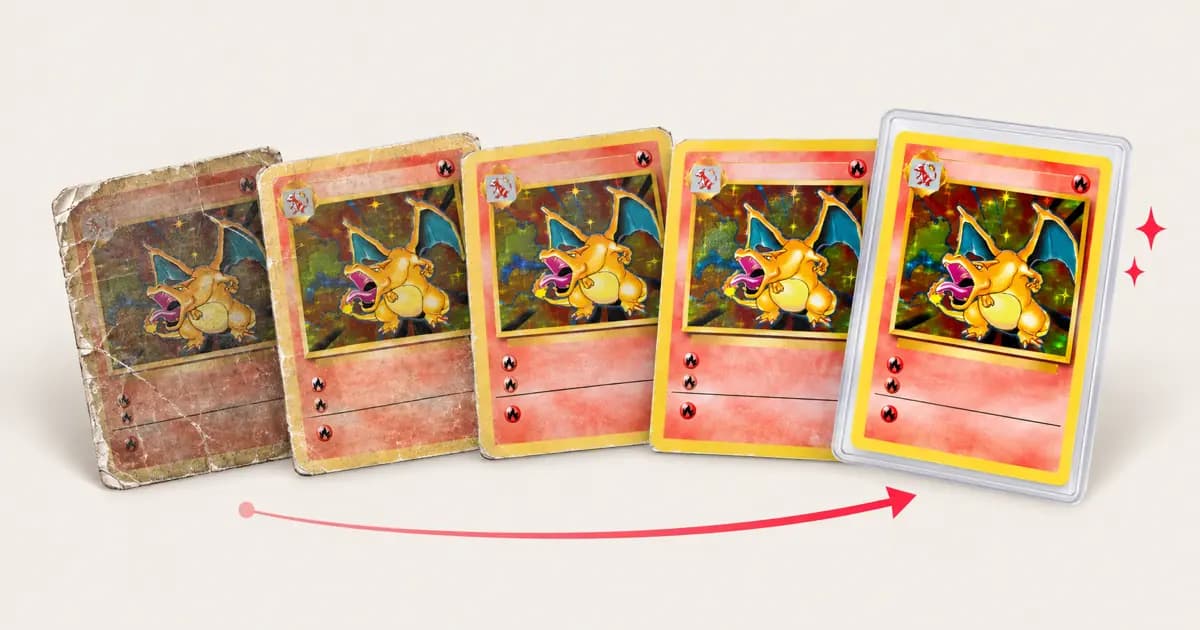
When a Pokémon card listing says Near Mint, Lightly Played or Damaged, what should you expect to see? These labels help buyers and sellers describe a card, but they are not a universal measuring instrument. A card near the border between two labels can be judged differently by different people or marketplaces.
Use the guide below as a careful first assessment. For a valuable card, inspect it under bright, indirect light and compare it with the condition rules on the marketplace where you plan to buy or sell.
Quick condition guide
| Common label | What you may see | What to check |
|---|---|---|
| Near Mint (NM) | Very light handling or storage wear; strong overall appearance | Tiny edge flecks, faint surface marks, print defects |
| Lightly Played (LP) | Noticeable but limited wear | Several small corner or edge marks, light scratches |
| Moderately Played (MP) | Clear wear that is visible without close inspection | More whitening, multiple scratches, a small dent or bend |
| Heavily Played (HP) | Heavy wear across one or more areas | Deep scratches, pronounced whitening, creasing or dirt that remains |
| Damaged / Poor | Structural damage or major alteration | Creases, tears, water damage, missing material, writing or trimming |
These are practical descriptions, not guaranteed equivalents. Some marketplaces use Excellent, Good, Played or Poor instead of LP/MP/HP, and their thresholds differ. Cardmarket, for example, publishes its own condition guide and notes that condition assessment is not an exact science. Read the platform's rules before listing a card.
Inspect the card in four areas
Take the card out of its sleeve only if you can do so safely. Hold it by the edges and use diffuse light first; then tilt it to reveal surface flaws. Avoid touching the face, breathing on it, or using liquids as part of an inspection.
1. Corners
Look for whitening, soft or rounded tips, bends, and tiny creases. A corner can look sharp from the front but show white fibers on the back. Check all four corners on both sides.
2. Edges
Inspect the full perimeter, especially the back of the card. Small white dots may be edge wear; larger chips or lifted layers are more serious. Do not mistake a factory cut or print issue for wear without comparing it with other copies of the same printing.
3. Surface
On holo cards, tilt the card under a light and look for scratches, scuffs, cloudy areas and fingerprints. Check non-holo surfaces for stains, indentations, residue, dents and pressure marks. A mark that appears only at one angle may still be a scratch or dent; take close-up photos from more than one angle.
4. Shape and structure
Check whether the card sits flat, and look for creases, bends, dents, peeling or water damage. A gentle curve is different from a sharp crease: a crease breaks the card's structure and leaves a line or pressure mark that cannot be flattened away.
Dirt versus damage
Some surface grime, loose dust or residue may sit on top of the card and be removable with appropriate care. Whitening, ink loss, scratches, dents, creases and water-swollen layers are physical damage. Cleaning can reveal the true surface, but it cannot rebuild missing print or paper.
That distinction matters when a card looks hazy or dirty. Before trying anything, read how to clean Pokémon cards safely and avoid sprays, solvents, polishing compounds and rubbing. They can leave residue or alter the finish.
Raw condition is not a PSA grade
Marketplace labels describe a raw card for a transaction. A PSA grade is a professional assessment on a separate scale. PSA says its graders assess characteristics including corners, edges, surface and centering; its PSA 10 description calls for sharp corners, original gloss and no staining, with stated centering tolerances. Even a careful home inspection cannot promise a grade.
If you are considering grading, use your condition check to decide whether the card merits closer inspection—not to predict an exact number. Our guide on preparing a Pokémon card for PSA grading covers the next steps.
Photograph and describe flaws honestly
For a sale, use clear pictures of the front and back, plus close-ups of any flaw. A short, accurate description builds more confidence than a generous condition label. When in doubt, choose the more conservative category and disclose the detail.
Unsure whether a mark is surface dirt or permanent damage? Have the card assessed before grading or selling. A careful assessment can help you understand what may be improved and what should simply be disclosed.
Sources: Cardmarket's card condition guide · PSA grading standards
Frequently asked questions
- What does LP mean for a Pokémon card?
- LP means Lightly Played. It usually describes a card with visible but limited wear, such as a few small edge or corner marks. The exact threshold depends on the marketplace, so check its condition guide and the seller's photos.
- Can cleaning change a card's condition?
- Cleaning may remove loose dirt or residue, but it cannot reverse whitening, scratches, creases, dents or other physical wear. Assess the card again after any safe cleaning and disclose any remaining flaws.
- Is Near Mint the same as PSA 8 or PSA 9?
- No. Near Mint is a raw-card marketplace description, while PSA 8 and PSA 9 are professional grades assigned under PSA's standards. They are different systems and do not convert directly.
Related articles
- Should you clean or restore a card before grading?When cleaning and restoration help a Pokémon card's grade, when they don't, and where the honest line is between conservation and altering a card.
- How to prepare a Pokémon card for PSA gradingWhat graders actually look at, how to give your card its best shot, and why a clean, flat card can mean a higher grade.
- How to clean Pokémon cards safely (without ruining them)A careful, step-by-step guide to removing dirt, grime and residue from Pokémon cards before grading, and the mistakes that damage cards for good.
Guides & tips
PokéRestore →